

On March 3rd, I wrote Becoming AI Native. Over 15,000 people have read making it my top post of the year so far.
I remember writing it on board a flight to Los Angeles, feeling appropriately detached from the real world as I did. It felt so abstract, so exciting, and with that pinch of anxiety that underpins all AI pondering.
When I re-read it recently, I was amazed at how prosaic so much felt.
At the end of March, I took the team to France for an AI offsite. We did two days of training, futuregazing, and began a true pivot for us as an agency. My instruction to the team was to treat it like zuck’s mobile moment.
The goals I set out in that first article, it turns out, were narrow and unambitious. All of the stuff I was pondering then that felt months away we achieved pretty much within thirty days.
And so today, I want to revisit with battle-hardened eyes and express what I think it now means to be AI native.
I would love to hear how your organisation is approaching this as well.
Defining “AI-native” or “AI first”
Here’s how I now think of AI native:
AI-Native. adjective.
Definition: 'A person or organisation who uses AI as the operating system for their work.”
The actual definition here isn’t too far away semantically from the original (getting AI to do work for you). But in practice the notion of an operating system changes things fundamentally.
Here’s what this looks like in practice.
Stages of AI adoption
Using AI as a chatbot
Using AI as a coding or writing or design assistant, but still within the core AI tool (ChatGPT for example)
Getting AI to do work for you (usually by integrating external systems)
Partial-agentic builds: you use AI to automate tasks you do, but still act as a human in the loop to validate and improve.
YOLO agentic: the AI is as good as humans at the task and does not need human supervision
Building self-improving systems that get better over time
Now the reason the idea of AI as an operating system is important is because to achieve stages five and six, you need to rethink how your work takes place.
AI as an operating system
First of all, when we think of an operating system what do we really mean?
Windows or MacOS or iOS are the major interfaces we use when we ‘use a computer.’
For those of us who got into computers in the 90s and early 00s, we all had to understand what an operating system was.
But as technology has stripped away friction and moved towards convenience, most people won’t really consider what happens when you open up your laptop.
The way I think about it is this:
The operating system is the mega app that you use to do all the other things you want to do
The operating system allows you to carry out lots of different functions and tasks
It has system files and data and infrastructure that mean all of your stuff just works together
For a long time, in work, we’ve used the operating system to open up all the separate applications that allow us to complete work (Excel, Sheets, Slack, MySQL, Photoshop, whatever it is).
Now with AI, work lives in the operating system layer itself. When my colleague Mark said “the way I use a computer has fundamentally changed,” this is what he meant – we no longer open up separate tools to get work done.
Back when I thought AI native was about delegating tasks, I didn’t quite see the level of other stuff that had to take place for that to work effectively.
The work before the work (infrastructure and good data)
I spend twenty hours a week building with AI, and the majority of that time has been spent on infrastructure work.
AI is very good at interpretting random documents. You no longer need perfect data for a computer to interpret it.
But actually making sense of it reliably is a different issue.
There’s two major reasons why:
Context rot – what happens when you have too much context in one session
LLMs are probabilistic and so will give different answers
Now maybe those two things are fine for a one off piece work. But if you want to regularly have AI perform cross-app analysis and automation for you, you need it to be cost-effective and reliable.
Cost effective means having the data in an easy-to-read system for the AI (i.e. not Notion). And reliable means having results that have ‘truths’ within them and look the same no matter how many times you run them.
Data infrastructure is how you solve this.
For us, that has meant creating a Second Brain for our entire agency. But it has also meant migrating systems into bespoke databases and setups, which are built exactly for what we need them for.
I was always quite good at SQL and so the database side of things comes a bit more easily to me than most. But the Second Brain stuff relies on concepts that are more ephemeral. And it has required a lot of experimentaiton.
I’ve probably spent over £3k on building the Second Brain, and I’d still not consider it in a v1 state yet, (we’re v0.6).
In short, to do the job really well, there is a lot of work that takes place before the work begins.
You need your data layer as a foundation for the operating system to work.
This is the big thing: without the data layer properly in place, the rest of your operating system falls apart.
It’s not just individual apps within your OS that suffer – it’s how they interact with each other.
Consider this:
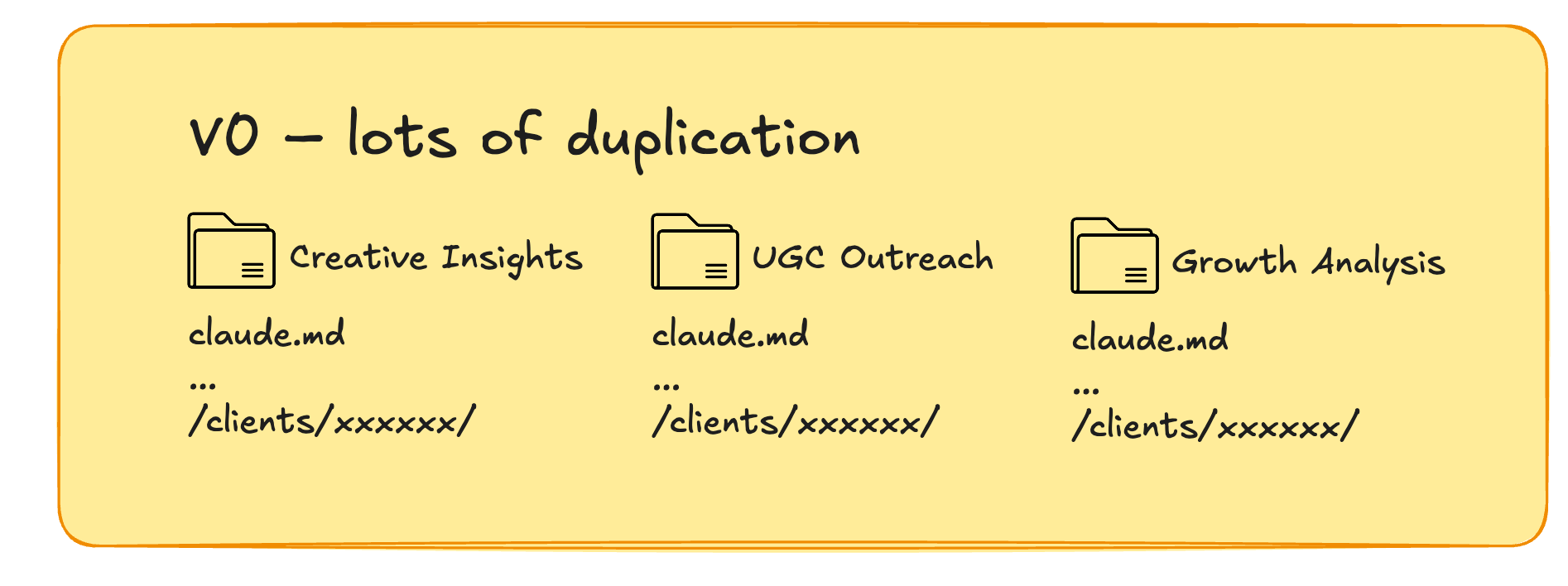
In our first setup, we realised that each team’s repos started having overlap. Maybe it was clients folders, or maybe it was team structure info, or maybe it was rules on how we accessed bigquery.
This is a reflection of pre-AI workflows. Every team even if well connected will end up duplicating sets of variables and templatable information.
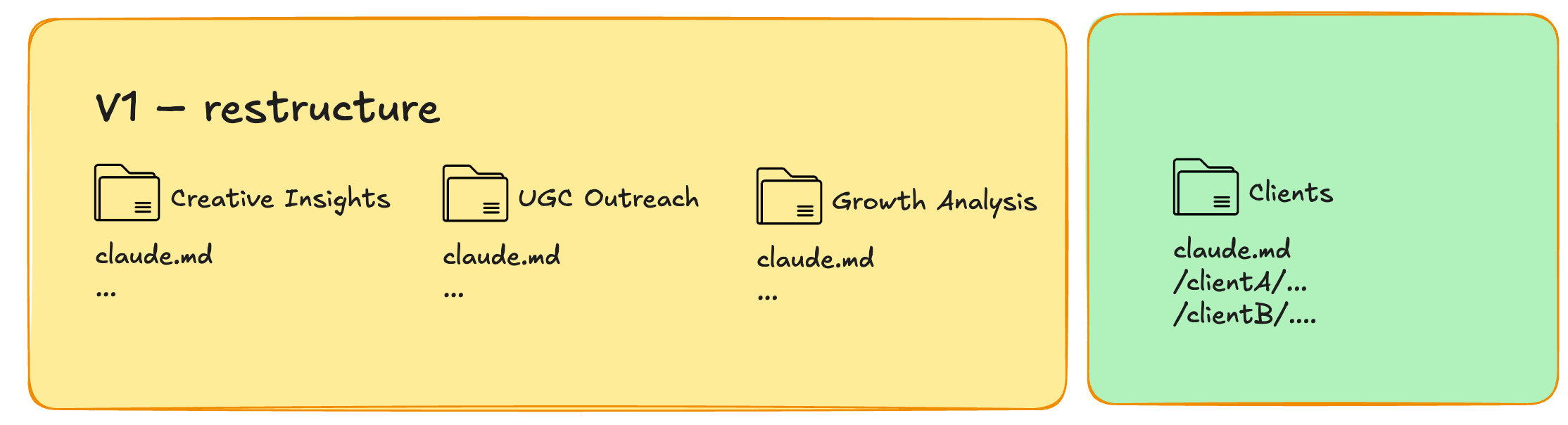
Now we have a separate repo that looks after all uniform client data, and each individual repo accesses those client work directly. No overlap of work, no stray versions.
Your operating system is only as good as the infrastructure within it.
The blurry lines of using your AI vs working on the AI
In the early parts of this year, I did a lot of building tools (mostly skills) for the team.
It didn’t take long for people to stop using them and instead start interacting with Claude itself. In some cases, we spent a long time building automated tools in Slack only for the team to prefer working in VS Code.
We went back and forth on whether this was the right workflow or not.
What I’ve realised now is that there’s four core modes of working with our AI:
Automations
Context-rich AI environment
Build & development
Acting as a backend for another tool
At the start these blurry boundaries felt wrong, but once you get into the operating system mode of thinking it all makes more sense.
Importantly all four of these can be inside one folder/project/repo/agent.
An example of how we might structure is this:
/cc/ballpoint/design/
/cc/ballpoint/growth/
And so within the ‘design’ folder we have the above four modes. Here they are in more detail.
Mode 1: Automations
After the initial hurdle of getting AI into a good enough place that it completes tasks for us, the next phase was removing ourselves from that process.
First you build the workflow. For us, this is usually a heavy mixture of scripts that the AI has vibe coded for us, with a small smattering of LLM skills thrown in.
Second, you automate it. There’s loads of ways of doing this from Claude’s Managed Agents, to cron jobs on your machine.
All of these live inside the core agent, maybe in a set of subfolders like:
/cc/ballpoint/insights/scripts/reddit_scrape.py
/cc/ballpoint/insights/skills/fresh-research.md
This is where I imagined most AI work would stop.
Mode 2: Context-rich AI environment
Once the team were comfortable working with Claude Code, the next thing was the realisation that everyone prefers being in the command line inside this agent.
Take the /insights/ agent. That likely exports information to a certain location. Maybe it also has a database that’s questionnable.
But what’s far more natural is to fire open a terminal window, point it at /cc/ballpoint/insights/ and ask Claude “what’s the oddest insight we have about Tesla?”
This is one of the most exciting day-to-day use cases for us because of how rich the context is. Not only that it still has the skills and scripts on hand to do further analysis. Throw in some memory/dreaming aspects and this gets richer by the day.
This is the mode that extends beyond the operating system idea. It’s as if an operating system had perfect search and context.
Mode 3: Build
In March, I view was that AI skills would often be one-and-done.
Instead, we now see AI as product development.
Every team is a product team.
There is a PM on every team who owns the roadmap, which filters up into the company roadmap. And building is everyone’s responsibility, where we log commit and push count.
Build mode is when you might be thinking about improving your software. Maybe it’s adding a new feature, or bug fixing, or maybe working towards much bigger releases. All of this work still exists inside the usual agent directory.
Mode 4: Acting as a back-end for another tool
We’ve been late to vibe coding inter faces, mostly because the team prefers the command line. But the last month or two we’ve been increasing the amount we’re doing here.
As such we hit the issue of realising that one agent or project or software may want to borrow data from another. While we aim to create good databases where we can, often data does live in markdown or as outputs from one agent’s workflows.
At this point we realised that having agents be able to talk easily to one another was important. Usually this is the case of adding an extra script or skill just to signpost what to share when called by another directory.
But this interoperability between agents we’ve made, I realised is one of the final strings to the ‘AI as an OS’ bow in my mind.
What comes next?
Self-improving systems
The above is mostly where we’ve gotten to so far. A bunch of interconnected systems all with strong data infra beneath it. Product teams build agents. Agents talk to each other. Work is more comprehensive, based on more learning and more insight.
But the next stage is the most exciting.
It’s how we build self-improving systems.
Tom Blomfield talked about this a few months ago in a YC lecture.
I went away and built what he talked about.
We called it Lenny (named after the intern’s favourite PM Lenny Rachitsky). Lenny would listen to Slack every day, identify workflows that might be automated, then build those skills and set up those automations.
For us, it wasn’t the right order of magnitude to have an impact.
I think for products over services, maybe it makes more sense. You can analyse user behaviour or feedback en masse, and then build updates and get feedback loops.
We’re still a service business. And so for us many ‘servicing’ jobs are often one-offs or infrequent or bespoke, and so having a skill run them is a waste of time.
For us, self-improving we’re now thinking bigger. If we have a skill that gathers data for us, instead of us deterministically giving inputs, how can it analyse new requests, maybe even build fresh data structures and analyse them, for example.
Closing thoughts
Underpinning all of these ideas is the fundamental rethink that AI is a new operating system.
It’s not a place you go to get it to do a piece of work for you.
Nor is it a place to go to build an automation.
It’s many things all at once, which all interact with each other.
When I first wrote about AI native in March, the idea was that we could one day get AI to do a task for you. After a month of pivot, over 80% of tasks at Ballpoint were done for us by AI.
If you’re not there, then getting there is a revolution. And I highly recommend that as your first goal. But the impact of AI seems to be exponential. What feels like climbing Everest one month will feel like a pebble in the road the next.
This remains the most fun I’ve ever had at work.
My only question now is: in five months time how prosaic will these ideas feel to me then? I can’t wait to find out.
Josh Lachkovic is founder of Ballpoint, the AI-native growth agency for brands looking to grow ad spend from £100k per month to £1m profitably. If you want to see how we can help grow your brand through creative-driven performance marketing, then get in touch.